Authentik vs. Pocket ID vs. Keycloak: Choosing SSO for a Mixed Self-Hosted Network
Single sign-on gets complicated when an environment contains both modern OIDC applications and older tools that only know about local passwords. DigiLAN has both, plus mobile clients, webhooks, automation accounts, and Active Directory as the intended source of truth for people and application-access groups. That mix changes the answer: the best identity provider is not simply the smallest one or the most enterprise one. It is the one that can cover the estate without forcing every application through the same brittle path.
The short answer
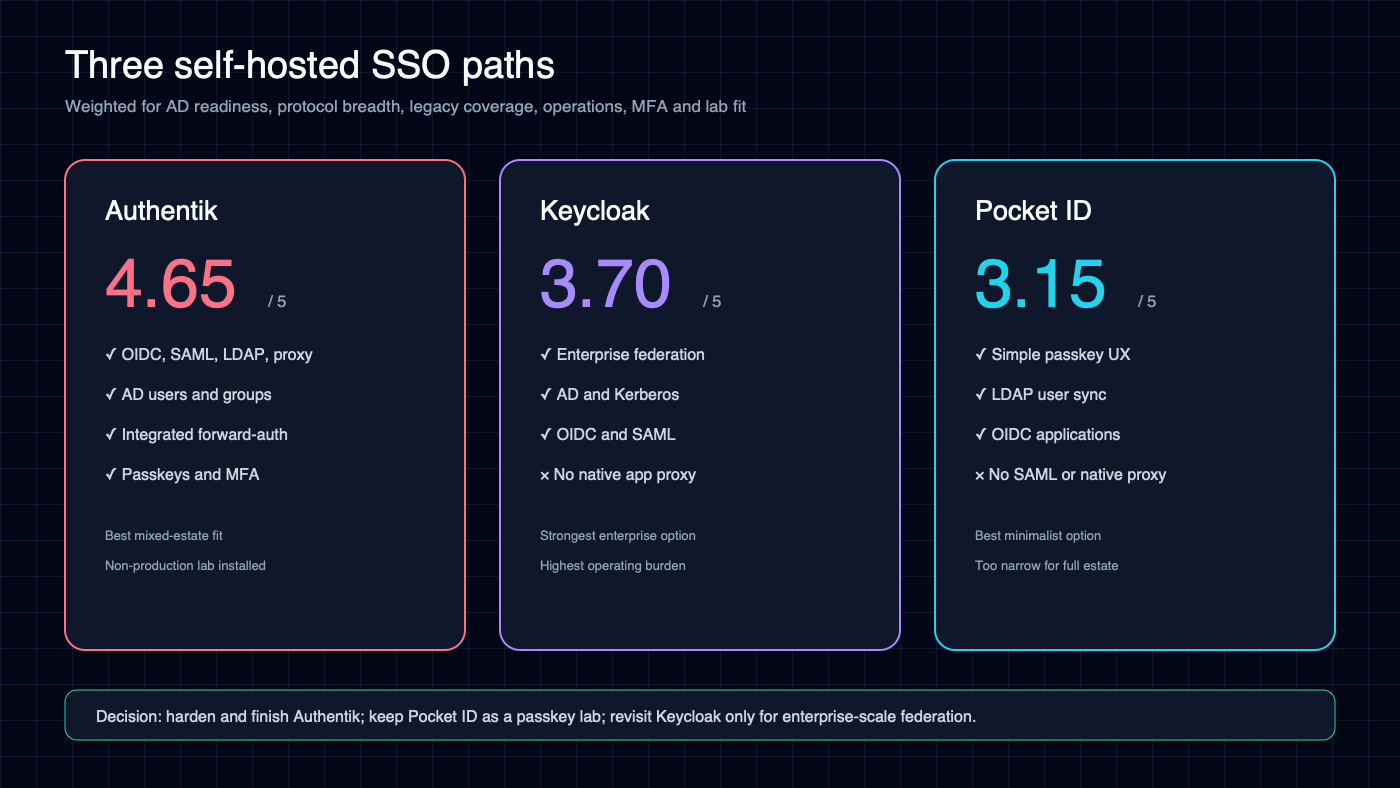
Authentik is the best primary SSO provider for this environment. Pocket ID is an appealing passkey-first option, but it is intentionally OIDC-focused and needs another component to protect applications without native OIDC. Keycloak has the deepest enterprise identity capabilities, particularly around Active Directory and Kerberos, but brings more operational weight and still needs separate middleware for generic forward authentication.
A weighted comparison based on AD readiness, protocol coverage, legacy-application coverage, operating effort, MFA and passkeys, provisioning, and fit with the existing lab deployment produced the following directional scores:
- Authentik: 4.65/5
- Keycloak: 3.70/5
- Pocket ID: 3.15/5
What the checks mean
The matrix below uses the requested binary check or X, but with a deliberately strict definition:
- ✓ means the provider can deliver a viable SSO path by itself: native OIDC/SAML/LDAP integration, a documented application integration, or—in Authentik’s case—its built-in application proxy.
- ✕ means the provider alone cannot provide safe, service-level SSO to the currently known deployment.
Pocket ID and Keycloak can be paired with OAuth2 Proxy, Pomerium, Caddy Security, or ingress middleware. Doing that would turn many X entries into front-door login checks, but it also introduces another policy engine and failure domain. A front-door proxy is not always application SSO: it may leave the application’s local login intact, and it can break APIs, mobile clients, webhooks, feeds, and callbacks.
| Service | Authentik | Pocket ID | Keycloak | Best route or caveat |
|---|---|---|---|---|
| AdventureLog | ✓ | ✓ | ✓ | Native OIDC |
| DoneTick / Chores | ✓ | ✓ | ✓ | Native OIDC |
| Flightlog / JetLog | ✓ | ✕ | ✕ | Authentik proxy; no established native SSO |
| Home Assistant | ✓ | ✕ | ✕ | Authentik community integration; preserve local and mobile access |
| Homebox | ✓ | ✓ | ✓ | Native OIDC |
| HomeLable | ✓ | ✕ | ✕ | Authentik proxy for the browser UI |
| Mealie | ✓ | ✓ | ✓ | Native OIDC |
| Vikunja | ✓ | ✓ | ✓ | Native OIDC |
| dizqueTV | ✓ | ✕ | ✕ | Proxy the management UI; exclude stream endpoints |
| NZBHydra2 | ✓ | ✕ | ✕ | Authentik proxy; preserve API-key access |
| Radarr | ✓ | ✕ | ✕ | Authentik proxy/header auth; preserve API paths |
| SABnzbd | ✓ | ✕ | ✕ | Authentik proxy; preserve API clients |
| Seerr | ✕ | ✕ | ✕ | Account model remains tied to Plex/Jellyfin/Emby or local users |
| Sonarr | ✓ | ✕ | ✕ | Authentik proxy/header auth; preserve API paths |
| Tautulli | ✓ | ✕ | ✕ | Documented Authentik integration; retain Plex-related behavior |
| Paperless-ngx | ✓ | ✓ | ✓ | Native OIDC/social-account integration |
| Backrest | ✓ | ✕ | ✕ | Authentik proxy; retain emergency local access |
| Homepage | ✓ | ✕ | ✕ | Authentik proxy |
| NetBox | ✓ | ✓ | ✓ | Native OIDC; map operator/admin groups carefully |
| Portainer | ✓ | ✓ | ✓ | OAuth/OIDC; verify feature availability in the installed edition |
| Uptime Kuma | ✓ | ✕ | ✕ | Authentik proxy; keep public status pages and probes separate |
| Vaultwarden | ✓ | ✓ | ✓ | OIDC, but integrate late and retain master-password recovery |
| Grafana | ✓ | ✓ | ✓ | Native generic OAuth/OIDC |
| VMware ESXi | ✕ | ✕ | ✕ | Standalone ESXi should use its supported local/AD path; it is not vCenter |
| Hermes Agent web interface | ✓ | ✕ | ✕ | Proxy the web control plane only; chat channels and agents remain separate |
| n8n | ✕ | ✕ | ✕ | True OIDC SSO requires an eligible n8n Enterprise plan; never proxy webhooks |
| Oddbyte WordPress | ✓ | ✓ | ✓ | Maintained OIDC plugin for administrators; public readers remain public |
| Lindahl.us WordPress | ✓ | ✓ | ✓ | Maintained OIDC plugin for administrators; public readers remain public |
| Wiki.js | ✓ | ✓ | ✓ | Native OIDC; stage after local pilots because it is externally hosted |
| Stupid Little Cups | ✕ | ✕ | ✕ | Public/custom workload with no established identity integration target |
| Pi-hole | ✓ | ✕ | ✕ | Authentik proxy for the admin UI; DNS remains independent |
| ntfy | ✕ | ✕ | ✕ | Mobile and API clients require service-native credentials/tokens |
| Maintainerr | ✓ | ✕ | ✕ | Authentik proxy |
| IT-Tools | ✓ | ✕ | ✕ | Authentik proxy; ideal disposable proxy pilot |
| NetAlertX | ✓ | ✕ | ✕ | Authentik proxy |
| Legacy Heimdall | ✓ | ✕ | ✕ | Authentik proxy |
| Legacy Organizr | ✓ | ✕ | ✕ | Authentik proxy/integration |
| Legacy Prowlarr | ✓ | ✕ | ✕ | Authentik proxy; preserve API-key access |
Database containers, Redis/Valkey, Qdrant, Tika, Gotenberg, workers, KMS, Watchtower, backup companions, and other machine-only components are intentionally omitted. They do not have human interactive login surfaces and should use service credentials, network policy, and secrets management rather than browser SSO.
Why Authentik fits this estate
Authentik supports OIDC/OAuth2, SAML, LDAP, SCIM, proxy, and RADIUS provider types. Its LDAP source can import users and groups from Active Directory, while its proxy provider can protect an application directly or work as forward-auth behind an existing reverse proxy. That combination matters here: modern applications can use native OIDC, while older browser interfaces can be gated without deploying a second identity-aware proxy.
Pocket ID is elegant when the desired policy is “LDAP provisions users, but every human authenticates with a passkey.” It synchronizes LDAP users and groups, provides OIDC, and includes useful client examples. It explicitly does not include a built-in proxy provider, however, and it does not offer Authentik’s protocol breadth.
Keycloak is the strongest option for complex enterprise federation. It supports LDAP/AD credential validation, OIDC, SAML, identity brokering, Kerberos, passkeys, and extensive mapping. Its production footprint and operational expectations are correspondingly larger, and legacy applications still need separate proxy middleware.
Prerequisites before configuring Authentik
Authentik is installed only as a non-production lab instance. Its former configuration was throwaway data, so on September 10, 2026 it was rebuilt cleanly on Authentik 2026.8.2 with PostgreSQL 16 rather than migrated from the observed 2024.12.3 stack. No application should depend on it until its recovery and operating foundations are in place.
1. Recovery before identity
- Before the lab becomes a production dependency, back up the Authentik PostgreSQL database.
- Back up data, custom templates, and certificates under the Authentik application-data paths.
- Record bootstrap and signing-secret references without copying secret values into documentation.
- Perform an isolated restore and verify login, flows, providers, certificates, and group mappings.
- Create and test a local break-glass administrator before connecting AD.
2. Upgrade and pin the platform
- The disposable 2024.12.3 lab was replaced with a clean 2026.8.2 deployment; no old identity data was migrated.
- Read release notes before future upgrades, especially changes to proxy routes, storage paths, trusted proxies, or flows.
- Keep the explicit 2026.8.2 image tag until the next reviewed upgrade rather than using an unbounded tag.
- Take a fresh database backup immediately before each production upgrade.
3. Stabilize the access layer
- Keep
authentik.digilan.orgon stable internal and external DNS as intended. - Use valid TLS and confirm certificate renewal.
- Verify the reverse proxy sends the required forwarded headers and WebSocket traffic correctly.
- Restrict direct access to Authentik and its outpost so clients cannot forge trusted proxy headers.
- Synchronize time across Authentik, AD, the reverse proxy, and client systems.
- Configure SMTP for recovery and security notifications.
4. Decide the directory contract
- Use AD as the source of truth for human users and application-access groups, beginning with a pilot scope.
- Create a least-privilege AD bind account.
- Use LDAPS and install the issuing CA chain in Authentik.
- Choose immutable user identifiers and group mappings before the first large sync.
- Start with one-way user/group synchronization and leave password writeback disabled.
- Define what disabling or deleting an AD account must do in Authentik and each application.
5. Establish authorization and recovery rules
- Create one predictable AD access group per application, using names such as
APP-Vikunja-Access. - For applications with useful role separation, create role groups instead of one undifferentiated grant. NetBox begins with
APP-NetBox-RO,APP-NetBox-RW, andAPP-NetBox-Admin. - Map the three NetBox groups to matching NetBox permission groups: view-only object permissions, add/change permissions, and administrative permissions. Authentication claims do not replace NetBox’s own authorization model.
- Do not grant every directory user access to every application.
- Keep machine accounts, API tokens, webhooks, backup jobs, and agents outside interactive SSO.
- Preserve tested local administrators for Authentik, Vaultwarden, NetBox, Portainer, Home Assistant, n8n, and the reverse proxy.
- Document behavior during AD, Authentik, DNS, reverse-proxy, and Dockerlab outages.
A low-risk pilot program
Yes—the environment has an unusually good disposable pilot target already running: the experimental native-subagent-docker-trial Traefik Whoami container.
Pilot A: proxy authentication with no valuable data
- Place Whoami behind an Authentik single-application proxy provider.
- Create pilot users and groups locally in Authentik; do not connect AD yet.
- Require WebAuthn or TOTP for the pilot group.
- Test allowed access, denied access, logout, expired sessions, reverse-proxy failure, and local break-glass recovery.
- Destroy and recreate the provider to prove the configuration can be recovered from documentation.
Pilot B: disposable native OIDC
- Deploy a small disposable OIDC test client rather than risking a real service first.
- Test redirect URIs, PKCE, claims, groups, token expiry, logout, and account disablement.
- Connect a dedicated AD test OU over LDAPS only after the local flow works.
- Disable a test AD user and verify the result in Authentik and the client.
Pilot C: first real applications
After both disposable pilots pass, use Vikunja and Mealie as the first real native-OIDC applications. They exercise actual account creation and group assignment without immediately risking the credential vault, infrastructure source of truth, container control plane, home automation, or webhook-heavy automation platform.
Paperless, NetBox, Grafana, AdventureLog, Homebox, DoneTick, and then Portainer can follow. Wiki.js should come after the local pattern is repeatable. Vaultwarden, Home Assistant, n8n, ntfy, Seerr, and ESXi should remain explicit design reviews rather than ordinary integrations.
The target state
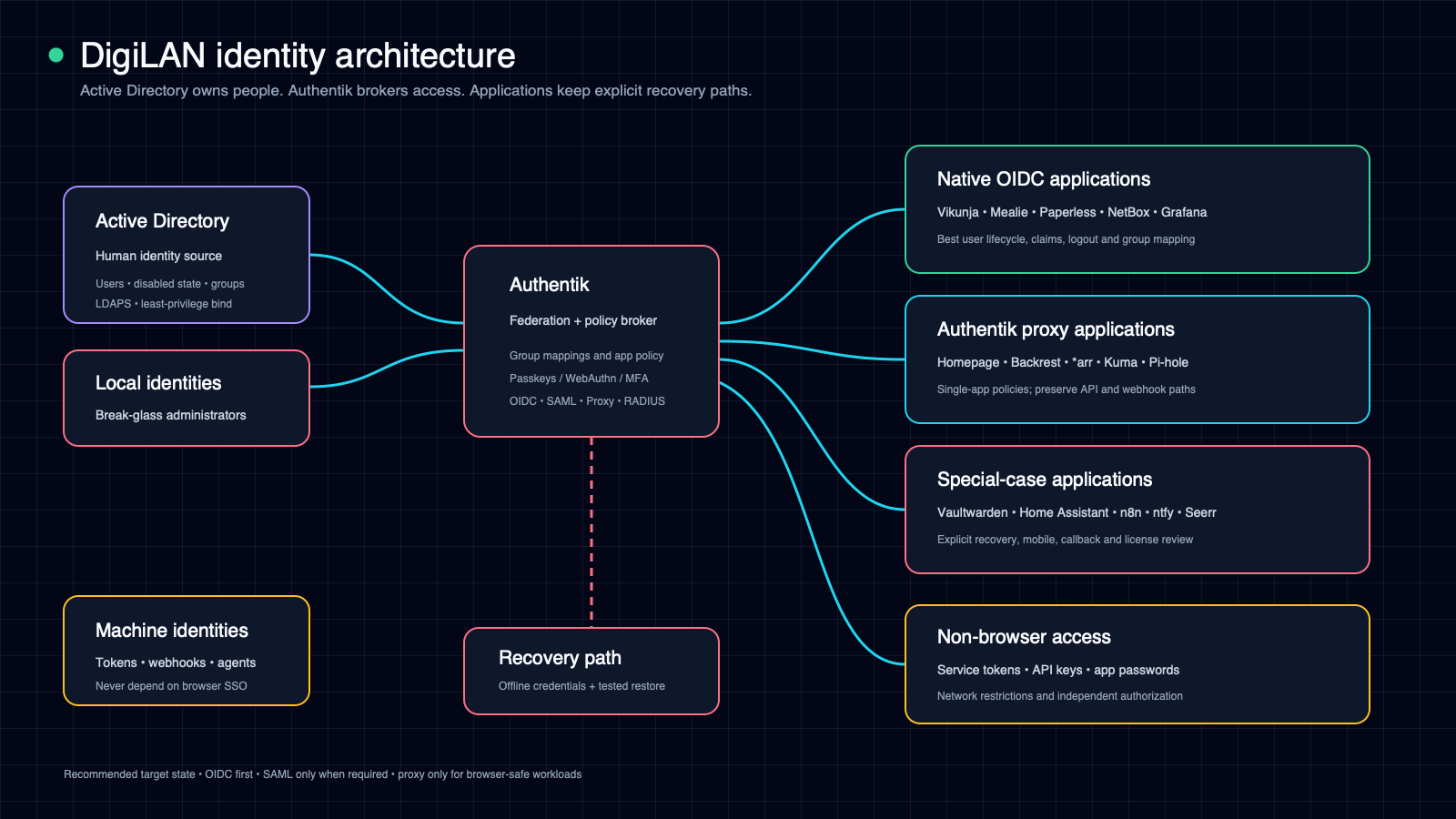
The clean architecture is simple to describe even if the rollout requires care:
- Active Directory owns people and groups.
- Authentik owns federation, interactive authentication, MFA/passkeys, and application access policy.
- Applications use OIDC first, SAML only when required, and proxy authentication only for browser-safe workloads.
- Machine access uses service-native tokens and remains independent of browser SSO.
- Every critical control plane keeps a tested recovery login.
That makes Authentik the practical winner—not because it is the smallest or the most enterprise product, but because it spans the awkward middle where this environment actually lives.
Sources and further reading
- Authentik provider types
- Authentik proxy provider
- Authentik LDAP source
- Authentik Active Directory integration
- Authentik upgrade guidance
- Pocket ID introduction
- Pocket ID LDAP integration
- Pocket ID proxy guidance
- Pocket ID client examples
- Keycloak Server Administration Guide
- Keycloak production configuration
- n8n OIDC availability and setup