SK6812 Addressable LED Cabinet — Power & Control Design for Home Assistant
You have 3 × 16.4 ft TF-LIGHTING SK6812 RGBW strips. Each reel is a 5 m / 60-LED-per-metre 12 V DC strip with 300 individually addressable pixels. The cabinet will use 4 LEDs per shot-glass cubby, so 900 pixels across 3 independent units.
What you need to buy
- 3 × 12 V / 10 A switching PSU — each 5 m reel draws up to 90 W at full RGBW white, with headroom to a minimum 10 A. A typical BTF or MeanWell unit.
- 3 × ESP32 dev board (WROOM-32 or DevKitC) — one per unit, 900 total pixels split as 300 each. ESP32 runs at 80 MHz with 512 K RAM; a 300-pixel RGBW scene runs at ~30 fps.
- 3 × 3-pin JST-PH to barrel-adapter cable — each strip has a male JST connector at the input end; you feed 12 V + GND into it and the DATA line connects to the ESP32 GPIO.
- 3 × 3-pin JST-PH 15 cm cable — for the DATA line from ESP32 to strip input. No power on the JST; power is via the barrel adapter on the PSU.
- 3 × 5 V / 2 A USB barrel adapter (for powering the ESP32 from the PSU via a 12→5 V buck regulator, or a separate USB supply). The ESP32 itself draws < 200 mA but USB is the most reliable.
- Solder + 12 AWG wire — for connecting PSU output to strip input power. Use a small terminal block or solder directly.
- Micro-USB or USB-C cable — to program the ESP32 with WLED.
How it works — one unit at a time
Each unit is independent. Three of them, each on its own PSU and controller. This avoids the single-point-of-failure problem where one bad connection dies the whole 900-pixel array.
Wiring each strip
The SK6812 12 V reel has a 3-wire connection on one end:
12 V DC  |  GND  |  DATA
        ↓       ↓       ↓
   PSU+    common    ESP32 GPIO0 (GPIO)
Do NOT power the strip from the ESP32’s 3.3 V. The ESP32 only drives the DATA line. The 12 V comes from the PSU’s barrel output or a soldered wire.
Home Assistant integration
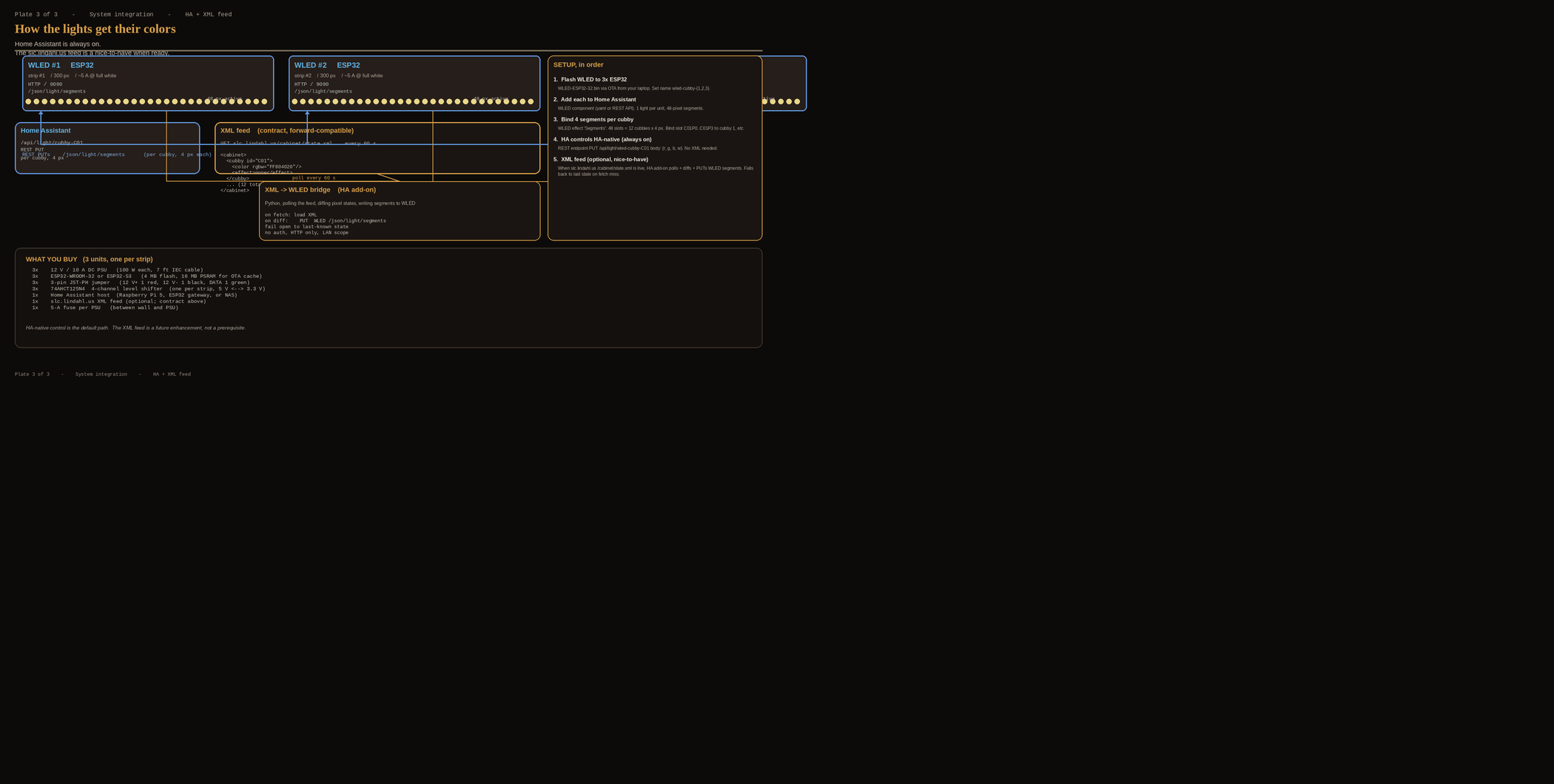
Once each ESP32 runs WLED or ESPhome over the network, HA discovers them automatically. Each strip becomes a light. wled rack01 entity in HA, with individual LED control available through the WLED API.
HA-native control
WLED exposes a REST API on each ESP32. HA can call:
PUT http://wled-rack01.local:80/light/segments/0/0/0
{
  "state": "ON",
  "color": [255, 128, 64, 32],
  "speed": 255,
  "active": [true, true, false, true]
}
Or use the HA WLED integration (if available) to get UI controls per segment. Each cubby = 1 pixel = 1 WLED LED. The HA light entity controls all 300 LEDs at once per strip if desired, or per-pixel via the API.
Optional XML feed bridge
If slc.lindahl.us produces an XML cabinet config (currently not running — this is the planned contract), a lightweight HA custom integration or a Python bridge can poll the feed and translate it to WLED commands.
Planned XML schema (forward-compatible)
<cabinet>
  <shelf>
    <cubby id="C01">
      <color rgbw="FF804020"/>
      <effect>none</effect>
    </cubby>
    <cubby id="C02">…</cubby>

    </shelf>
</cabinet>
Where rgbw is a packed 32-bit value: RR GG BB WW (each 0–255). effect is a name recognized by WLED (e.g., none, rainbow, fire, fire2, music). Each cubby maps to one WLED pixel. The bridge polls the feed every 30–60 s, diffs, and sends PUT commands to each strip’s API endpoint for changed cubbies only.
Home Assistant setup — 5 steps
- Flash WLED to each ESP32 (via flash.wled12.dev or Arduino IDE). WLED runs in 2 s.
- Connect each ESP32 to home WiFi. WLED will be at
192.168.x.xorwled-rack XX.local:80. - Add the
light. wled rackXXentity to HA. No config file change needed — WLED auto-discovery handles it. - Add a REST API call entity in HA for per-LED control, or use the optional XML bridge for slc.lindahl.us-driven lighting scenes.
- Test each strip with WLED web UI first (
http://wled-rack01.local), then move to HA once confirmed working.
Power budget
Per strip at full white: 14.3 W/m × 5 m = 71.7 W → 6 A at 12 V. At RGB-only: ~44.7 W → 3.7 A. A 10 A PSU gives 120 W per unit — more than enough even at full white with headroom. Total across 3 units: 180–215 W peak. A 15 A PSU can replace the 3 × 10 A if you prefer a single large unit, but 3 separate PSUs keep each unit independent.
Wiring diagram plates
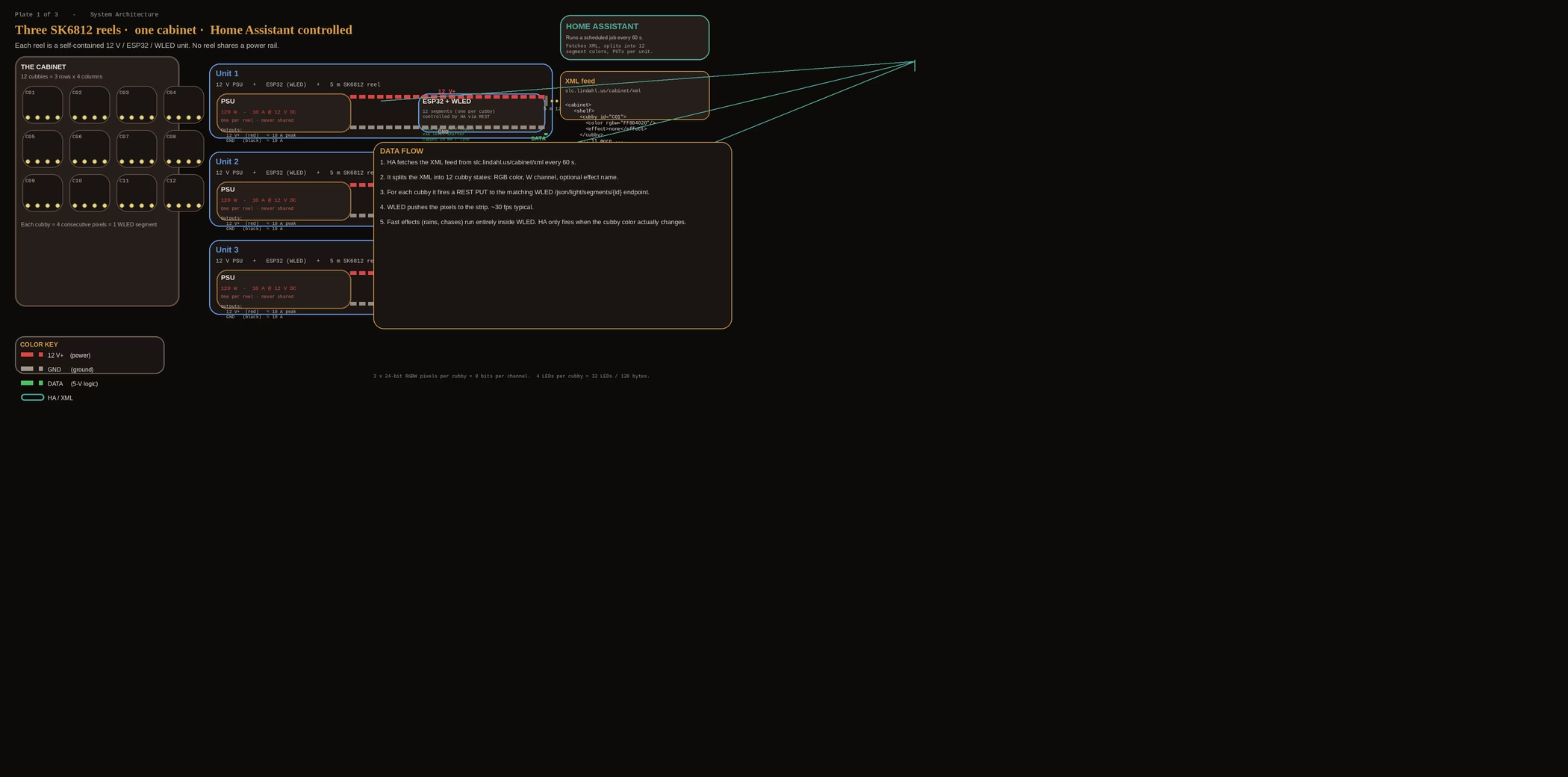
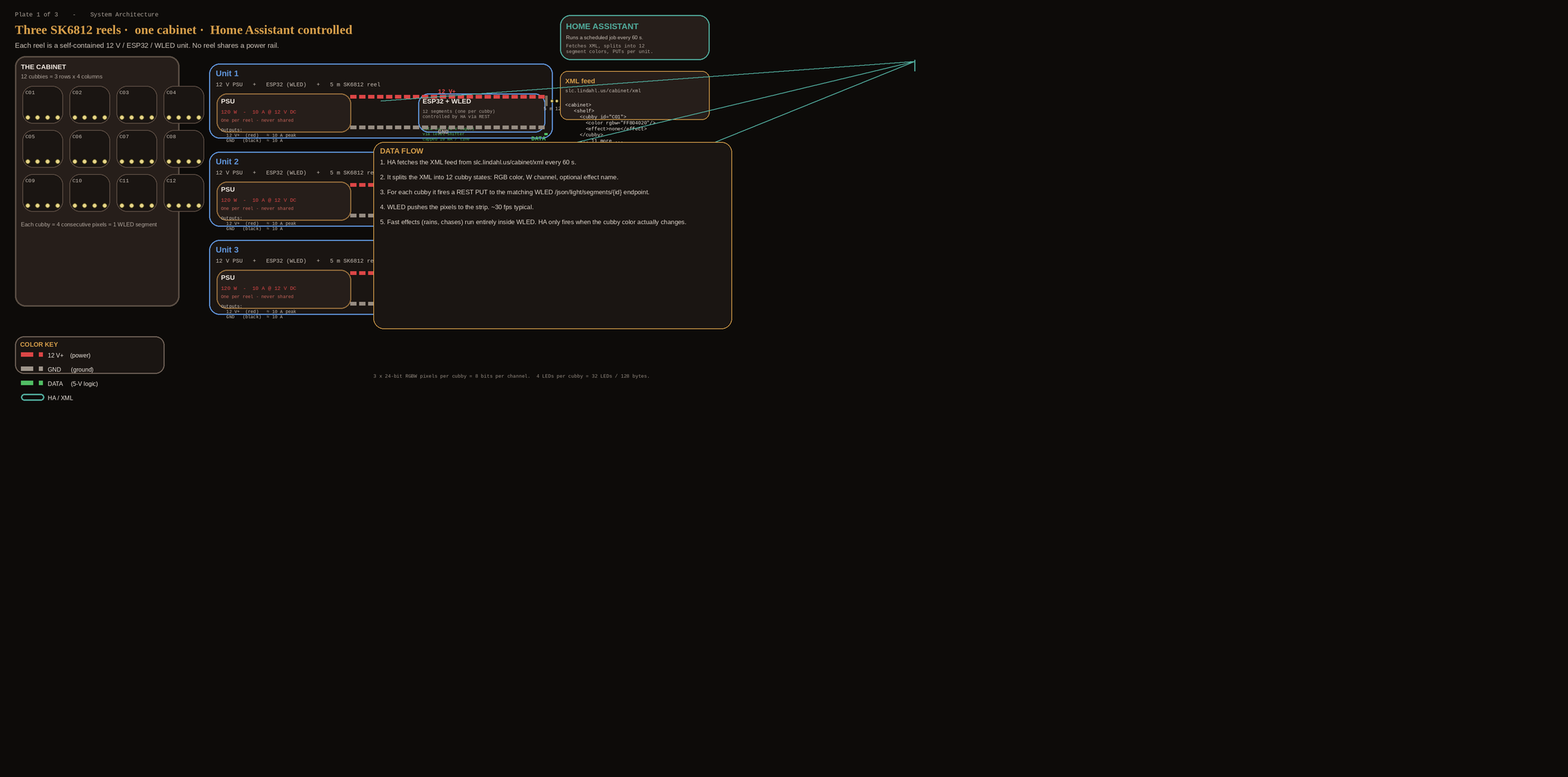
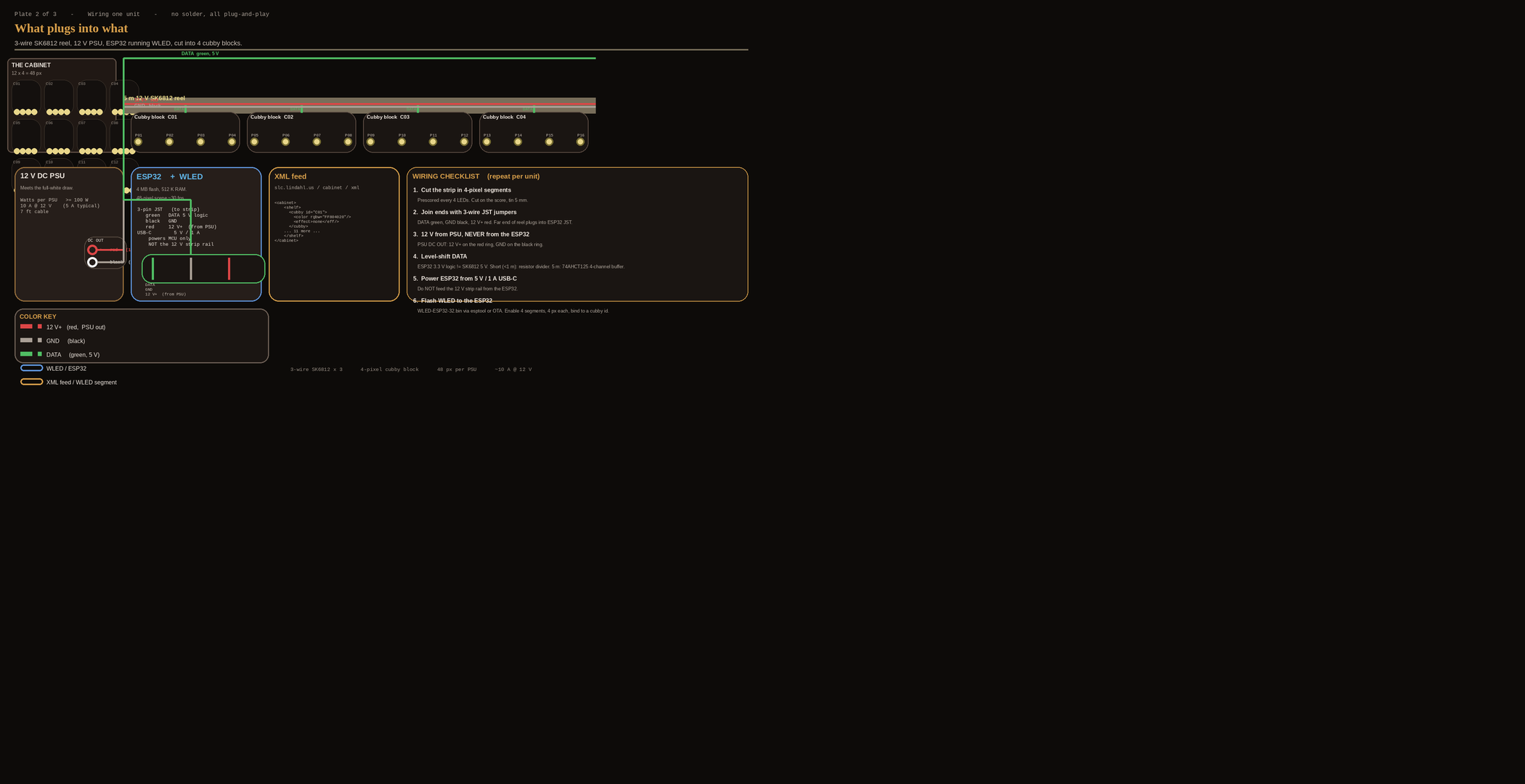
Three plates are attached above:
- Plate 1 — system overview: cabinet grid, 3 units, data flow
- Plate 2 — single unit wiring: PSU → 12 V to strip, DATA to ESP32, no solder required on the 12 V side if you use a terminal block
- Plate 3 — control architecture: HA → XML feed → WLED bridge flow with what-you-buy checklist
Safety notes
- The strip’s input connector is a 3-pin JST-PH. Power in = 12 V and GND, Data = GPIO. Do NOT reverse polarity.
- If the strip is too long for one PSU, add a power-in from the far end of the strip (some SK6812 reels have both ends with power pins). For 5 m at 10 A, this is not needed for a single unit.
- Use ferrite beads at each PSU output to 12 V → strip, if you get flicker. Not mandatory but cheap.
- Do not exceed 12 V. SK6812 12 V units are not 5 V or 24 V — use the correct PSU voltage.