
Moving WordPress without burning the bridge behind us
A small WordPress site can be deceptively hard to move. The files are easy enough. The database is familiar. DNS takes a few minutes. Yet the site is a living pile of small agreements: upload paths, rewrite rules, plugins, scheduled jobs, cached URLs, TLS, and a database that must match the files from the same moment.
We recently moved SugarCove.us from an older single-purpose machine to a DigitalOcean server. SugarCove is a small family site for The Big House, a gathering place in Western North Carolina. It mixes house history and trip notes with a directory of restaurants, shops, and things to do nearby. That mix matters during a move because the site is more than a handful of ordinary WordPress pages.
The public result looked uneventful, which is exactly what a good migration should look like. Pages loaded, directory listings remained intact, administration still worked, and the old installation stayed available as a rollback point.
The interesting part was the order of operations. We treated rollback as a deliverable, not an emergency idea we could improvise later.
Make the backup prove itself
A WordPress migration normally begins with two pieces: a database dump and an archive of the application files. Having both files is not the same as having a backup.
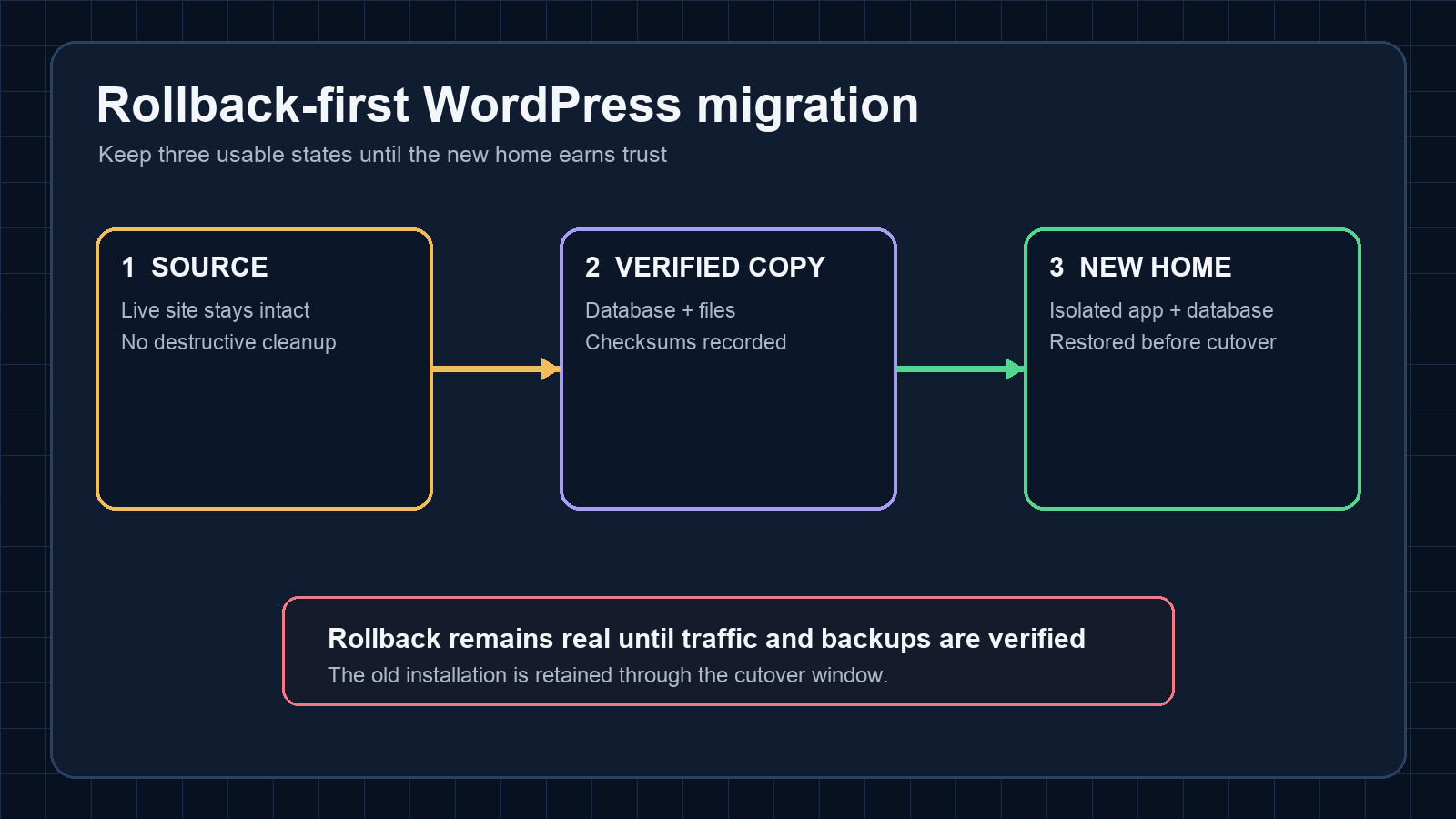
Before changing the destination, we created a fresh database dump and a compressed archive of the WordPress files. Both archives received SHA-256 checksums, and we verified them again after transfer. The database contained 30 tables. We also opened the compressed streams rather than assuming that a successful copy meant a readable backup. Temporary copies on the source were removed after transfer, while the verified copy remained outside the machine being migrated.
That last detail matters. If the source disk fails while its only backup sits on the same source, the backup is theater.
We also left the original site alone. No cleanup, shutdown, or irreversible upgrade was bundled into the move. The source became rollback material for the cutover window. It can be retired later, after the new home has accumulated enough clean backup history to deserve trust.
Restore into a boring, isolated shape
The destination was an existing DigitalOcean server, not a fresh machine dedicated to SugarCove. We added a separate WordPress container and a separate MariaDB container to its Docker Compose stack. Their data lives in site-specific volumes, and they have their own health checks. Isolation was less about chasing architectural fashion and more about keeping failures legible. A WordPress or database problem for SugarCove should not rewrite the dependencies of another site sharing the server.
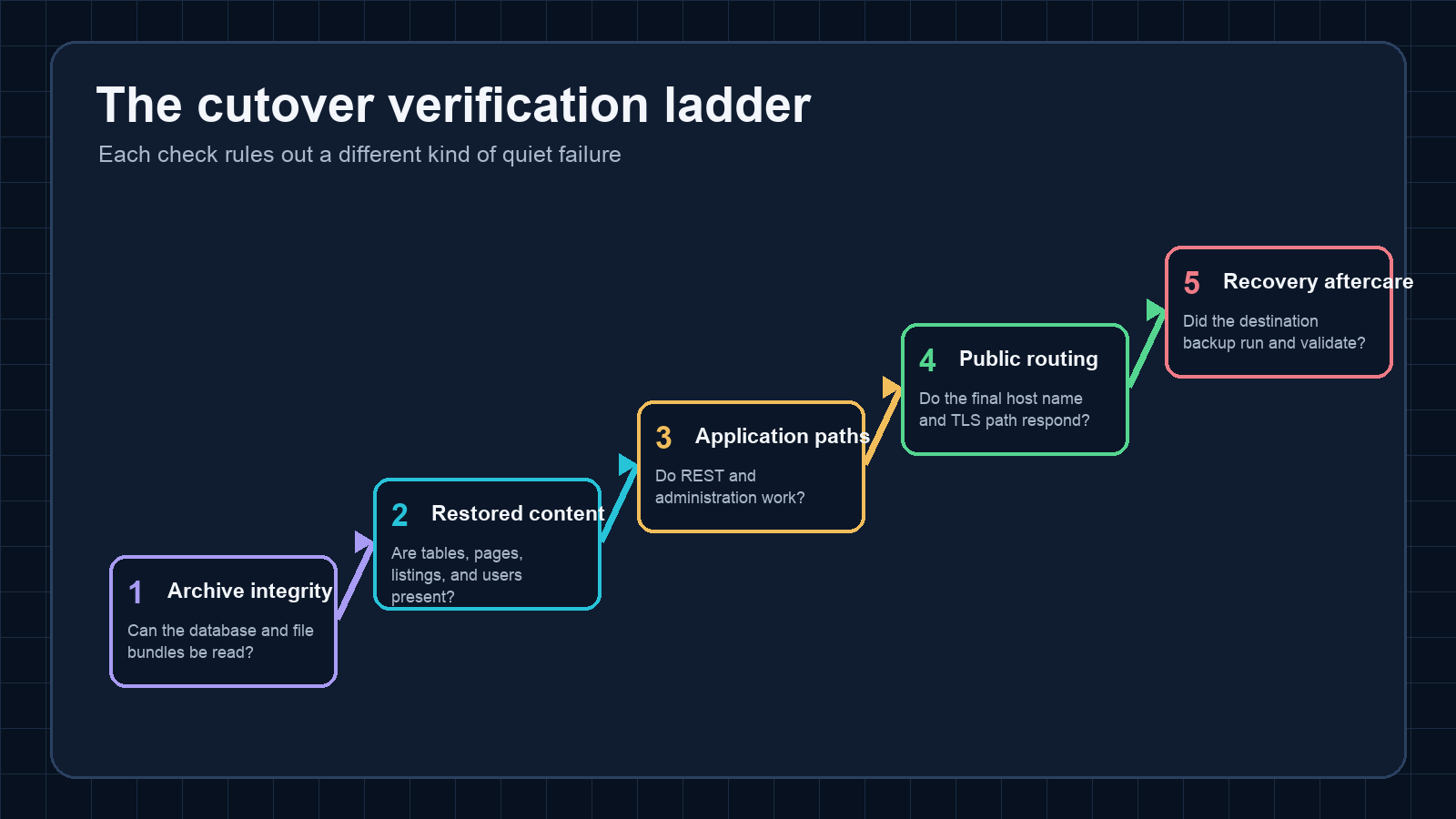
The restore happened before public traffic moved. Files went into place, the database was imported, and the WordPress URLs were adjusted for the final domain. We then checked the restored content through the application itself, including its REST interface and an authenticated administration path.
The inventory gave us concrete numbers to compare: 18 published pages, 11 published directory listings, and two WordPress users. Those counts are modest, but they were useful tripwires. If the destination reported ten listings or one user, the migration was not complete even if the home page looked perfect.
Counting restored objects helped catch a class of quiet failures that an attractive home page would miss. A migration can render beautifully while omitting an entire custom post type, losing users, or importing only part of a database. We compared the restored table set and the site's published content rather than trusting the first page we saw.
Verify the path before moving the signpost
DNS should be close to the end of the job. Before touching it, we tested the destination with the intended host name and TLS behavior. That exposed routing and certificate mistakes while the public still had a working site.
Only after the origin answered correctly did we update the SugarCove.us records in Cloudflare. Then we repeated the checks through Cloudflare and directly against the destination. The useful question was not simply, "Does the home page return 200?" We checked the REST endpoint, administration authentication, representative pages, a directory listing, media delivery, and the health checks for both new containers. We also confirmed that the other public services on the same DigitalOcean server were still healthy.
One route did fail after the first switch. A legacy reverse-proxy path returned a 502 when it tried to reach the new origin directly. Rather than leave a special bypass in place during the cutover, we pointed that route at the same Cloudflare-backed hostname used by ordinary visitors and tested it again. The public site stayed available while we corrected the secondary path. This was a good reminder that DNS is rarely the only route into an older site.
This made the cutover pleasantly dull. There was no frantic repair session with visitors already arriving at a half-configured host.
Backups belong in the migration, not the someday list
A successful restore proves yesterday's backup, not tomorrow's. The new stack received a daily backup job on the day of the move. It exports the database, archives the WordPress files, writes a checksum, and validates the result. The first run completed immediately after migration and passed those checks.
There is an important caveat: that daily archive currently lives on the DigitalOcean server. It protects against a bad update or damaged WordPress volume, but not the loss of the server or provider account. Independent off-site or provider-level recovery still needs its own proof. We did not label that complete just because a timer ran successfully. Backup claims should stay narrow enough to survive contact with an actual outage.
That distinction is easy to blur during a migration because the visible site is already working. The temptation is to declare victory and move on. A better finish line includes the first successful backup on the destination, a retained source, and a written list of recovery work that remains open.
The checklist we will reuse
The reusable version of this migration is short:
- Capture database and files from the same maintenance window.
- Validate both archives and retain a copy away from the source.
- Restore into isolated services without changing public traffic.
- Check content counts, application endpoints, authentication, and dependent routes.
- Test the final host name and TLS path before the DNS change.
- Cut over, then repeat checks through every public path.
- Run and validate the destination backup immediately.
- Keep the old installation intact until rollback risk has genuinely passed.
None of these steps is exotic. Their value comes from sequence and restraint. The migration stayed reversible until the last practical moment, and each check answered a specific failure mode instead of offering vague reassurance.
SugarCove.us now runs from DigitalOcean behind Cloudflare, while the former installation remains available for rollback.
That is less dramatic than a clean break, but drama is a poor success metric for infrastructure work. The quiet cutover was the point.